A ProgressOS Capability

AI Process Mapping

Every process your teams run — maintenance, operations, quality, safety — mapped, version-controlled and connected inside ProgressOS. Describe a workflow and AI structures it into a governed BPMN diagram, linked directly to the SOPs, work instructions and training built from it. No specialist tools, no workshops, no standalone diagramming software to maintain.

Included in every ProgressOS workspace

Minutes From description to process diagram
BPMN 2.0 Export-ready international standard format
PDF · VSDX · DOCX Multiple export formats included

What Is AI Process Mapping?

AI process mapping turns hours of manual diagramming into a short, guided AI conversation. Traditional process mapping requires specialist knowledge of notation standards, dedicated software and significant time investment. The Progress Collective eliminates that barrier.

Describe your process in plain language — the platform produces a complete, structured process map with roles, steps and decision points ready for review, refinement and export. Documentation that previously required days of consultant workshop time is completed in minutes, making it practical to map entire process libraries across maintenance, operations, quality and safety functions.

What You Gain

Faster Documentation

Cut process documentation time from days to minutes. Generate complete process maps instantly from a plain language description.

Reduced Consulting Cost

Eliminate the need to pay specialists to build process maps. Analysts and ops teams can document processes themselves.

Operational Standardisation

Create consistent, structured process maps across all teams and functions — removing ambiguity and duplication.

Audit Readiness

Maintain a living library of documented processes that demonstrates control and supports certification audits.

How It Works

  1. Describe your process, workflow or activity in plain language — as much or as little detail as you have.
  2. The AI generates a structured process diagram with roles, tasks, decision points and flow logic.
  3. Review and refine the output directly in ProgressOS — adjust steps, add exceptions or expand sections.
  4. Export the finished process map as PNG, SVG or BPMN XML for use in your management system.

Frequently Asked Questions

Do I need BPMN knowledge to use this?

No. You describe your process in plain language and the platform handles the notation and structure. The output is compliant with BPMN 2.0 standards without requiring you to learn the standard.

Can I edit the generated process map?

Yes. You can ask the AI to revise any part of the process map — add steps, adjust roles, insert decision gateways or restructure flows — through a natural conversation.

What formats can I export the process map in?

Process maps can be exported as PNG images, SVG vector files or BPMN XML — suitable for embedding in documents, presentations or process management systems.

Is process mapping linked to SOP generation?

Yes. A process map can be the foundation for generating SOPs, work instructions and training materials — all from the same initial description.

Should I review the AI-generated process map before using it operationally?

Yes. Treat the generated map as a strong first draft — review roles, steps and decision points with the relevant process owner before publishing it to your management system.

How is this different from using ChatGPT?

ChatGPT can describe a process in words, but it doesn't produce a structured, exportable BPMN diagram, doesn't persist or version your process library, and isn't connected to the platform's SOP, work instruction and training generation pipeline. The Progress Collective is purpose-built for structured, reusable process documentation.

Bring Process Mapping Into Your Operating System

Describe any workflow in plain English. AI structures it into a governed BPMN diagram, versioned and connected to every SOP, work instruction and training module built from it inside ProgressOS.

Inside ProgressOS

From Description to Governed Process Map

Process mapping in ProgressOS isn't a standalone diagramming exercise — every process map lives in your process hierarchy, feeds directly into document generation, and stays under version control as your operations evolve.
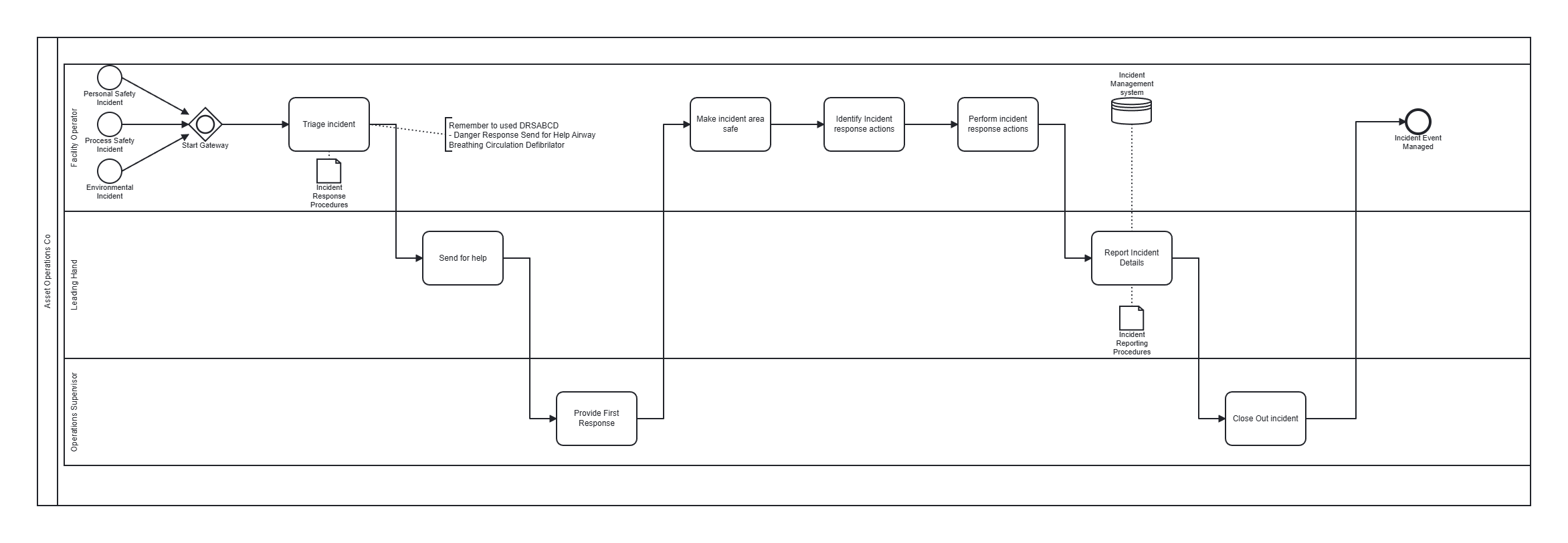
Example BPMN process diagram generated inside ProgressOS, showing lanes, tasks and decision gateways Example output — a BPMN process diagram generated inside ProgressOS
  • Plain-language input. Describe the workflow — the platform structures roles, tasks, gateways and flow logic.
  • Connected, not isolated. Every process map links to the SOPs, work instructions and training generated from it.
  • Version-controlled. Changes are tracked as your operations evolve — no more diagrams going stale in a shared drive.
  • Export-ready. PNG, SVG, BPMN XML, PDF and VSDX formats for use across your existing tools.